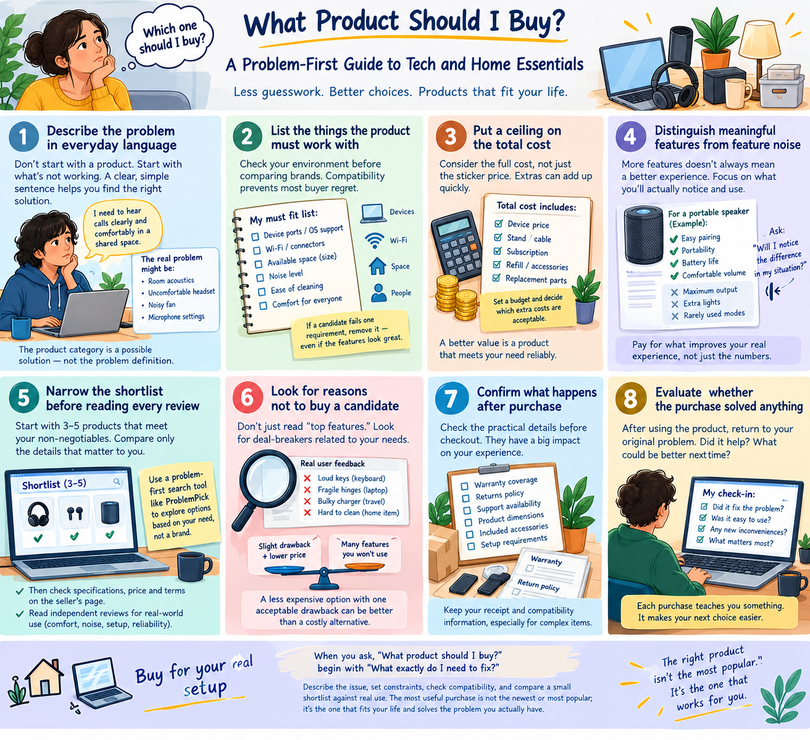

“Which one should I buy?” sounds like a simple question until you see dozens of similar-looking products with different features, prices, and reviews. This is especially common with technology and home essentials, where upgrades and new models arrive constantly.
The quickest route to a sensible purchase is often to stop thinking about products for a moment. Instead, describe what is not working in your current setup. A problem-first method cuts through specifications and helps you choose only what will make a practical difference.
Step one: describe the problem in everyday language
Imagine that video calls from your desk are difficult to hear. You might begin shopping for premium headphones. But the underlying problem could be poor room acoustics, an uncomfortable headset, a noisy fan, or a microphone setting.
Write one sentence: “I need to hear calls clearly and comfortably in a shared space.” Now you can consider different solutions and decide whether any purchase is needed at all.
The same idea applies to home storage, kitchen tools, charging accessories, or travel gear. The product category is a possible solution; it should not become the problem definition.
Step two: list the things the product must work with
Compatibility is one of the most avoidable causes of buyer regret. Before comparing brands, check the environment where the product will be used.
For technology, this may include device ports, operating-system support, Wi-Fi compatibility, physical connectors, and available space. For household items, measure storage areas, counters, shelves, and doorways. Consider noise, ease of cleaning, and whether the product can be used comfortably by the people who need it.
Create a short “must fit” list. If a candidate fails one of these requirements, remove it even if its feature list looks impressive.
Step three: put a ceiling on the total cost
A clear budget reduces decision fatigue. But compare total ownership costs, not only the initial price. A device might need a stand, cable, subscription, proprietary refill, or replacement component. These extras can change the value significantly.
Decide what you are comfortable spending and which added costs are acceptable. Avoid stretching the budget for features you cannot connect to your original problem.
A purchase is better value when it meets a need reliably, not when it simply has the highest specification count.
Step four: distinguish meaningful features from feature noise
Manufacturers often emphasize specifications because they are easy to compare. Real-world use is less tidy. A high number does not automatically translate to a better experience.
Take a portable speaker. If it will be used in a small room, ease of pairing, portability, battery charging, and comfortable listening levels may matter more than maximum advertised output. For a desk lamp, adjustable positioning and simple controls may be more important than extra connectivity features.
Ask about each feature: “Will I notice the difference in the situation I’m trying to improve?” If the answer is probably no, do not pay a premium for it.
Step five: narrow the shortlist before reading every review
Start with three to five products that meet the non-negotiables. Then compare only the details relevant to your situation. This prevents hours of comparing products that were never realistic options.
A problem-first search tool can help with this early stage. For example, ProblemPick is designed around describing a need and exploring related product options, rather than beginning with a particular brand. Once you have a shortlist, confirm current specifications, price, and terms on the seller’s own page.
Independent reviews remain important, particularly for details that product listings do not reveal well, such as comfort, noise, setup difficulties, or long-term reliability.
Step six: look for reasons not to buy a candidate
Instead of reading only “top features,” investigate possible deal-breakers. Search for reported issues connected to your needs, not just the lowest ratings overall.
If you need a keyboard for shared work, complaints about loud keys are relevant. If you travel often, reports about fragile hinges or bulky charging equipment deserve attention. If a home item is difficult to clean, that inconvenience may matter more over time than a decorative feature.
Compare the trade-offs honestly. A less expensive option with one acceptable drawback can be better than a costly alternative with benefits you will not use.
Step seven: confirm what happens after purchase
Before checkout, verify warranty coverage, returns, support availability, product dimensions, and included accessories. Read the terms that apply to the seller and region where you are purchasing.
Keep the receipt and any relevant compatibility information. For a complicated item, review the setup instructions before ordering so you know whether installation or additional equipment will be required.
These details do not make exciting headlines, but they have a major impact on the ownership experience.
Step eight: evaluate whether the purchase solved anything
After using the product, return to your original one-sentence problem. Did the new item improve the situation? Was a key constraint overlooked? Which features turned out to matter most?
This creates a simple learning loop for future purchases. You become better at recognizing the difference between a compelling advertisement and a useful solution.
Buy for your real setup
When you ask, “What product should I buy?” begin with “What exactly do I need to fix?” Describe the issue, set constraints, check compatibility, and compare a small shortlist against real use. The most useful purchase is not automatically the newest or most popular; it is the one that fits your life and solves the problem you actually have.